
Private and on-device AI for business: a guide
A guide to private and on-device AI for Indian businesses: what it means, when it beats cloud AI, what hardware it needs, the risks, and where to read more.
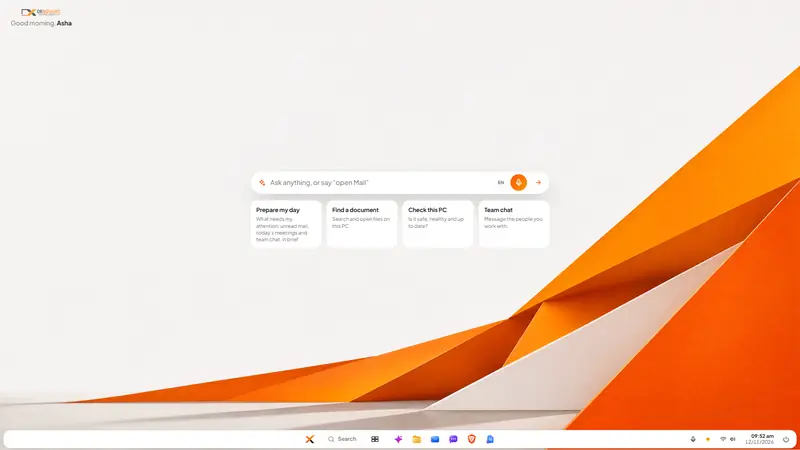
The short answer: private AI means your company can say exactly which computers a question and its documents touched. On-device AI is the strictest form of it: the model runs on the employee's own PC, so nothing is sent anywhere. In 2026 that is practical on ordinary office computers for everyday work such as drafting, summarising, sorting and answering questions about your own data. Use it for anything confidential, keep cloud AI for the occasional task that needs the largest model and involves nothing sensitive, and write down which work goes where.
This page is the starting point for everything we have written on the subject. It explains the ideas in order and then lists each article with a line on what it covers.
What is private AI, in plain words?
An AI assistant is a program, called a model, that reads what you give it and writes a reply. The only question that matters for privacy is where that program runs.
- Public cloud AI. You type into a website or app, and your text travels to the vendor's data centre to be processed.
- Cloud AI on a business plan. The same journey, with a contract that limits how the vendor may use what you send.
- AI on your own server. The model runs on a machine your company controls, in the office or in a data centre you rent.
- On-device AI. The model runs on the laptop or PC in front of the employee.
Each step down the list gives the company more control and a smaller model. Private AI is any arrangement where the data does not leave your control. Sovereign AI is the wider idea that you, or your country, decide where the AI runs and which law applies. The test for both is the same: when an employee asks about a client, can you name the computers that question touched?
When is on-device AI the better choice?
When the material is sensitive, the task is ordinary and the work happens many times a day. That describes most office work.
| On-device AI | Cloud AI | |
|---|---|---|
| Where your data goes | Nowhere; it stays on the PC | To the vendor's data centre |
| Works without internet | Yes | No |
| Cost | No bill per question or per user for the AI itself | Usually per user per month, or per use |
| Size of model | Small | The largest available |
| Speed | Seconds, depending on the PC | Fast, depending on the connection |
| Best at | Drafting, summarising, sorting, explaining, reading documents | Long research, difficult reasoning, unfamiliar subjects |
The right-hand column is not a criticism. Large cloud models are simply better at hard, open-ended tasks. The mistake is using them for everything, including the salary sheet and the client contract, because they are the only tool at hand.
What hardware does on-device AI need?
Less than the advertising suggests. An "AI PC" in the sense Microsoft uses for its Copilot+ PCs needs a special processor called an NPU, 16 GB of RAM and 256 GB of storage, and some features are reserved for those machines. But the direction in 2026 is towards small language models that run on ordinary processors, with memory needs of a few gigabytes.
So the practical advice is: buy AI PCs when you are replacing machines anyway, and do not replace working machines only to get AI. Nova, the assistant in DNX OS, runs on the PC's own processor with no graphics card, and works on machines with 4 GB of RAM, with 8 GB recommended.
What can a small on-device model do, and not do?
It can do the jobs that fill an office day:
- Write and rewrite letters, emails and notices.
- Summarise a long document or email thread.
- Suggest folders for files and mail.
- Turn a recording of a meeting into minutes.
- Explain a setting or write a command for the person who looks after the PCs.
- Read scanned documents.
It will not match a very large model on a long research report about a subject it has never seen, and it takes seconds, not a blink, more on an older machine. It can also be wrong, like any model. The rule that a named person reads the output before it is used applies wherever the AI runs.
What are the risks of AI at work, and how are they handled?
There are three, and they need different answers.
Data leaving the company. Staff paste contracts and customer details into public tools because nothing safer is at hand. This is shadow AI. A ban does not stop it. A short list of what must never be pasted, plus an approved tool that is as convenient, does.
Wrong answers used as facts. The answer is a rule of responsibility, and for numbers, a tool that shows its working. A business-intelligence AI should show the query it ran, so that the figure can be checked.
AI that acts. An AI agent does not only answer; it opens apps, sends messages and changes files. Agents can be misled by instructions hidden in the content they read, which is called prompt injection. The vendors' own documentation recommends that a person confirm any action with real consequences. Set three rules before anything else: what the agent may touch, which actions need a human yes, and where that yes is enforced.
Does Indian law require AI to run in India?
Not in general. The DPDP Act does not ban processing personal data abroad, but it makes your company answerable for it, and the Government can restrict transfers. Some regulated sectors have their own rules. For most companies, running AI on their own machines in India is a choice that makes the duties simpler to meet, not a mandate. The guide to India's technology ecosystem covers this properly.
How should a company start?
- Ask what people already use AI for. Without blame. You need the list of tasks.
- Sort the tasks into two columns: may go to an outside tool, and must stay inside.
- Choose the tool for the second column: a business plan with contractual limits, your own server, or on-device.
- Put it inside the apps people already have open. A separate login loses to the public chatbot.
- Keep a person responsible for every output, and require approval for every action.
- Review each quarter. The tools and the tasks both change.
Where does DNX OS fit?
DNX OS is our own answer, so read this as a vendor's description. Its assistant, Nova, runs on the device, sits in the desktop's ask bar and inside Files, Mail, Meetings and Guard, and asks before it changes anything. Each AI service is sandboxed with no network access. DNX BI answers questions about business data in English or Hinglish and shows the query. Larger models on GPUs hosted in India, under the name DNX AI Cloud, are planned for 2027 and are not available today. DNX OS is in beta from December 2026 and launches in January 2027; you can apply for the beta to test it on your own tasks.
A further feature, AFRT, is coming and is opt-in: it is off until you switch it on, and it counts which apps and screens you use, never your files, messages or anything you type. The article on AFRT sets out exactly what it counts.
Which articles go deeper?
Start with the ideas
- On-device AI vs cloud AI for business: how to choose: the comparison in full, the tasks each suits, and a rule for which work goes where.
- Shadow AI: staff, ChatGPT and a policy that works: what goes wrong when staff paste data into outside tools, and a one-page policy.
- AI agents at work: why every action needs approval: what agents are, how they can be tricked, and the approval rules to set first.
- Business intelligence without a data team: asking plain-language questions of your own data, and how to check the answers.
- AFRT: software that adapts without reading your data: what adaptive software usually costs in privacy, and a design that keeps counts only.
See it working, in real screenshots
- Nova AI: a private AI assistant for office work: the on-device assistant in six screens, with its limits stated.
- DNX Mail: a business email app with private AI: summaries, drafts and sorting done on the PC.
- DNX Meetings: automatic minutes for any meeting: recording, transcription and minutes without uploading audio.
- DNX Terminal: run commands in plain language: a request in words becomes a command that is labelled by risk and waits for you.
Related, from other guides
- Staff using public AI with company data: what to do: the six-step implementation.
- Do you need an AI PC? On-device AI on ordinary PCs: the hardware question in detail.
- Where is your AI processed? Data residency in India: what the large vendors offer in India.
- A ChatGPT alternative for companies that cannot share data: a fair comparison with sources.
Unfamiliar word? The glossary defines each term used here in a few sentences.
More guides
- Operating systems for companies
- A guide to operating systems for Indian companies in 2026: ageing PCs after Windows 10, whether to buy AI PCs, the security baseline, and how to choose.
- India's technology ecosystem
- For Indian businesses: the DPDP Act, data residency, AI rules and sovereign, Made-in-India technology. What is law, what is choice, and what to ask vendors.
- Replacing the vendor stack
- A guide to replacing a stack of rented software: how to count what you pay, compare office, HR and chat tools, avoid lock-in, and switch without stopping work.
- Business challenges, solved
- Eight everyday business challenges in Indian companies, from stuck invoices to scattered documents, each with a step-by-step technology fix and its real cost.