
Do you need an AI PC? On-device AI on ordinary PCs
AI PCs need a special chip and 16 GB of RAM, but small language models now run on ordinary office computers too. What on-device AI can and cannot do in 2026.
Part of the guide: Operating systems for companies: what to run in 2026
The short answer: you do not need to replace your office computers to use AI that runs on the device. An "AI PC" in Microsoft's sense, a Copilot+ PC, needs a special processor called an NPU, 16 GB of RAM and 256 GB of storage, and some Windows features are reserved for it. But the direction of travel in 2026 is the other way: smaller models that run on ordinary processors. Google's and Microsoft's own documentation now describe on-device models with memory needs of a few gigabytes, and Microsoft says its newest one will reach PCs with no graphics chip at all. Buy AI PCs when you are replacing machines anyway. Do not buy them only to get AI.
What is an AI PC?
The term is marketing, but one definition is precise. Microsoft's specification page lists the minimum for a Copilot+ PC as "A compatible processor or System on a Chip (SoC) with an NPU capable of performing 40+ TOPs", "16 GB DDR5/LPDDR5" of memory and "256 GB SSD/UFS" of storage.
An NPU, or neural processing unit, is a part of the chip built to run AI calculations using little power. TOPS, trillions of operations per second, is the measure of its speed. Compare that with what Windows 11 itself needs: a two-core 64-bit processor, 4 GB of RAM and 64 GB of storage. A Copilot+ PC is a much higher bar than a Windows 11 PC.
What do you get on an AI PC that you do not get otherwise?
On Windows, a set of features that Microsoft reserves for Copilot+ PCs, such as improved search and some image tools, and a built-in language model that apps can call. That model is installed on Copilot+ PCs and runs on the NPU.
Whether those features are worth a new laptop depends on whether your staff would use them. For most office work, which is documents, spreadsheets, email and a browser, the honest answer today is that they are pleasant, not essential.
Three things are changing, and they all point away from the special chip being a requirement.
- Microsoft's documentation now says its on-device model also runs "on non-Copilot+ Windows 11 devices with a supported GPU", though at the time of writing this needs a preview build of Windows and a recent graphics card with at least 6 GB of memory. It is a test feature, not something on the PCs in your office.
- The same page says that model "is being replaced by Aion Instruct, a new on-device model", reaching retail devices in January 2027.
- Microsoft's browser team wrote in June 2026 that this newer model is "smaller, faster, and more efficient" and extends support to "devices without a GPU" through the ordinary processor. That was a developer preview.
In short, the largest PC software company is working to make on-device AI run on more ordinary hardware, not less.
What is a small language model?
The models behind the famous chatbots are enormous and run in data centres. A small language model is built to do a narrower range of tasks well in a few gigabytes of memory.
Two examples from the vendors' own pages:
| Model | Maker | Size | Licence | What the maker says |
|---|---|---|---|---|
| Gemma 4, small sizes | Google, April 2026 | About 2.9 GB or 4.5 GB of memory for the weights at 4-bit precision | Apache 2.0 | "run completely offline with near-zero latency across edge devices" |
| Phi-4-mini | Microsoft, February 2025 | 3.8 billion parameters | MIT | Intended for "Memory/compute constrained environments" |
Google's table comes with a caution we should repeat: the figures "only account for the memory required to load the static model weights", so real use needs more. Even so, a model of this size fits within the memory of a PC with 8 GB of RAM, and Google says the family was trained on over 140 languages.
Both licences are permissive, which means a company or a software maker can use these models commercially without a per-user fee.
What can a small model on an ordinary PC actually do?
Enough for a large share of office tasks, if you choose the tasks.
It does well: summarising a document or an email, drafting a routine reply, rewriting text more formally, pulling the dates and amounts out of an invoice, answering questions about a file you give it, turning a spoken note into text, and explaining an error message.
It does poorly: recalling facts from general knowledge. Microsoft's own model card says of its small model that it "simply does not have the capacity to store too much factual knowledge". It will also be weaker at long, multi-step reasoning and at writing a long report on a subject it has not been shown.
It is slower: an ordinary processor produces text more slowly than a data centre. We are not quoting a speed, because none of the vendor pages we read gives a figure for ordinary office processors, and it varies widely with the machine.
The trade is clear. You give up some capability and speed. You gain three things: the data never leaves the PC, it works without internet, and there is no fee per question. Microsoft's documentation for its local AI runtime lists the same benefits: "Your data never leaves the device", and "There are no per-token costs". We weigh both sides in on-device AI vs cloud AI for business.
So should a company buy AI PCs?
A simple way to decide:
- If a PC is due for replacement anyway, buy one with 16 GB of RAM and a recent processor. An NPU is a reasonable extra if the price difference is small. It will age better.
- If your PCs are working and have 8 GB of RAM or more, do not replace them for AI. Software that runs small models on the processor is arriving for them.
- In all cases, separate the two questions. "Which PCs do we need?" is about hardware. "Where should our AI run?" is about privacy and cost. Our article on where your AI is processed deals with the second.
And if the machines are old because they cannot run Windows 11, that is a third question, covered in what to do with old PCs after Windows 10.
How does DNX OS do on-device AI?
This is the bet DNX OS is built on, so here is our position and its limits.
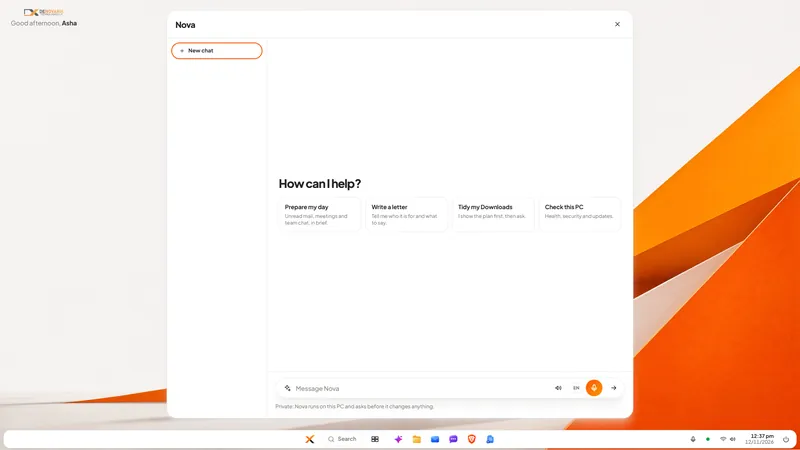
Nova, the assistant in DNX OS, runs on the PC's processor. It needs no graphics card and no NPU, and works on machines with 4 GB of RAM, with 8 GB recommended. It uses small models, each for a narrow job: answering and drafting, listening and speaking, and reading scanned documents. The line under every Nova chat says where the work happens.
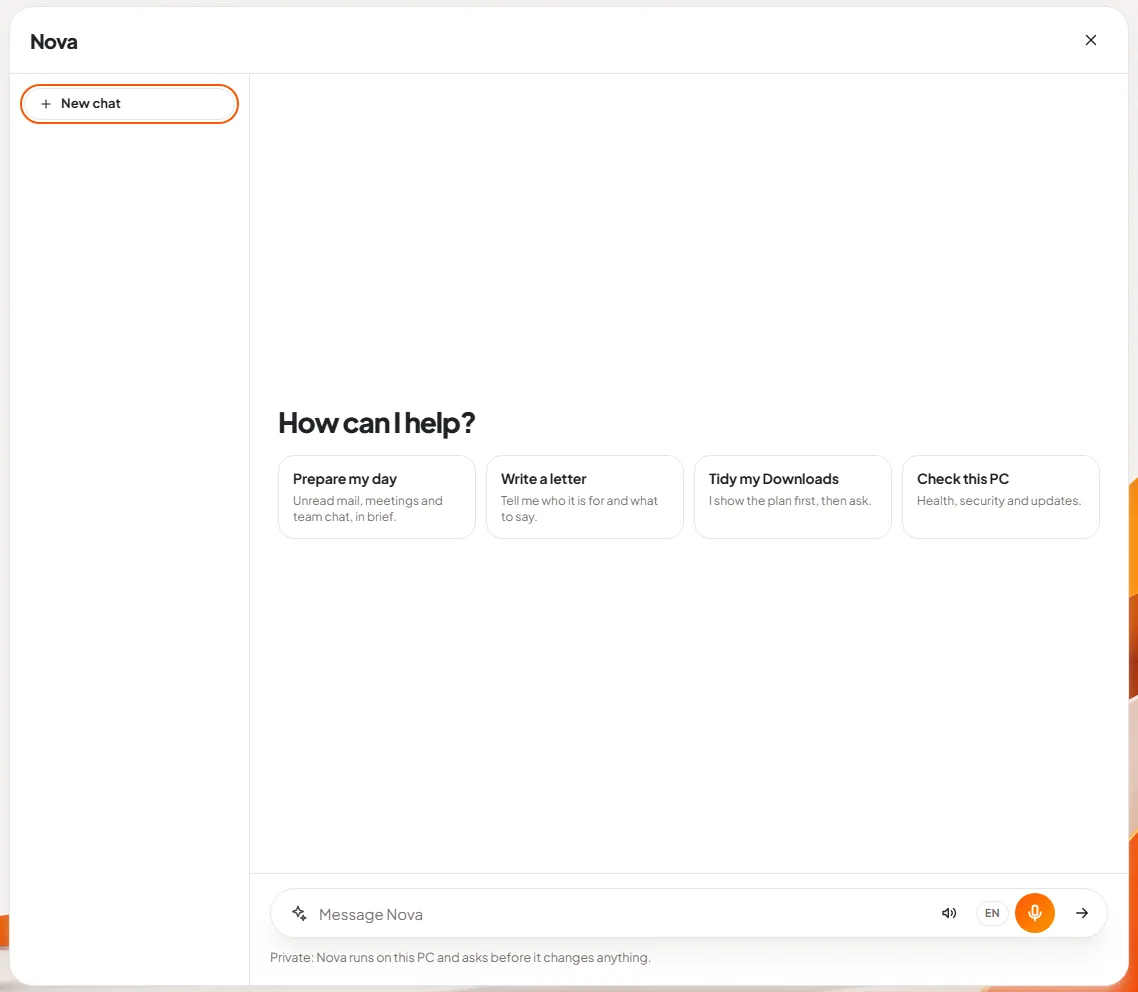
The limits are the ones described above, and we would rather you heard them from us. Nova is slower than a cloud assistant, especially on a 4 GB machine. It knows less general knowledge than a very large model. It is built for work on your own files, mail and PC, and it is good at that. Larger models hosted on GPUs in India are on our roadmap for 2027.
DNX OS is in beta from December 2026 and launches in January 2027. If you want to see what an ordinary office PC can do with on-device AI, apply for the beta and bring your oldest working machine. The walk-through of Nova shows the screens.
What is still uncertain?
- Microsoft's timeline. The January 2027 date for its new on-device model is a plan published in its documentation, and the model's reach on processor-only PCs was a preview when described.
- Speed on your hardware. Test on your own machines before deciding anything.
Sources
All sources were opened on 12 November 2026.
- Microsoft, Windows 11 specifications and system requirements: Windows 11 and Copilot+ PC minimums.
- Microsoft Learn, Get started with Phi Silica, dated 16 October 2026: on-device model, GPU preview, replacement timeline.
- Microsoft Edge Blog, Expanding on-device AI in Microsoft Edge, 2 June 2026.
- Microsoft Learn, What is Foundry Local?, updated 3 November 2026.
- Google, Gemma 4 announcement, 2 April 2026, and Google AI for Developers, Gemma model overview: sizes, licence, memory table.
- Microsoft on Hugging Face, Phi-4-mini-instruct model card.
Keep reading
Invoices stuck in approval: how to fix the queue
Supplier invoices wait for days because the approval rule lives in people's heads. Write the rule down, give it one queue and automate the chasing. Steps here.

Attendance and leave on WhatsApp: how to move off
Attendance in a register and leave approved on WhatsApp work until salary day. How a small Indian company moves both into one system, step by step, in a month.
Same data typed into ERP, CRM and Excel: how to stop
When an order is typed into the CRM, the ERP and a spreadsheet, errors and delay follow. How to connect legacy systems one field at a time, and keep them.