
Same data typed into ERP, CRM and Excel: how to stop
When an order is typed into the CRM, the ERP and a spreadsheet, errors and delay follow. How to connect legacy systems one field at a time, and keep them.
Part of the guide: Business challenges and how technology solves them
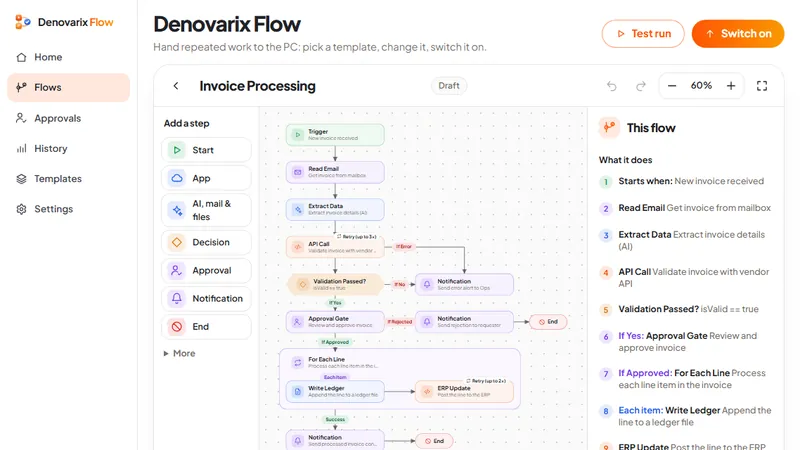
The short answer: retyping happens because each system was bought to solve one department's problem and none of them was told about the others. You do not have to replace them to stop it. Choose one system as the owner of each piece of data, move that data to the others automatically in one direction, and start with a single field that causes the most trouble. A connection is only possible where the older system offers a way in, so the first technical job is to find out what each system can export and accept.
Why does the same data get typed three times?
Take a 40-person distributor of industrial supplies, as an illustration. Sales staff record a new customer and an order in the CRM. The accounts team types the same customer and order into the ERP to raise the invoice. The dispatch team keeps a spreadsheet of what is to go out, typed from the invoice. When the customer changes a delivery address, it is corrected in one place.
Each team is doing its job properly. The company as a whole is paying for:
- Delay. The order exists in sales on Monday and in dispatch on Wednesday.
- Disagreement. Three customer lists with three spellings, and nobody sure which is right.
- Errors in money. A mistyped quantity or GST number reaches an invoice.
- Skilled people doing copying. The accountant's afternoon goes on data entry.
Buying one large system to replace all three is the answer usually offered. For a company this size it is a year of disruption, and the old systems often hold years of history in a shape that suits the business. Connecting them is slower to describe and much safer to do.
What do you decide before connecting anything?
One owner for each kind of data. Write a small table:
| Data | Owned by | Copied to |
|---|---|---|
| Customer name, GST number, addresses | CRM | ERP, dispatch sheet |
| Order lines and quantities | CRM | ERP |
| Invoice number and amount | ERP | CRM |
| Stock on hand | ERP | Nowhere; others look it up |
The owner is where the data is created and corrected. Everywhere else it is a copy that people may read and may not edit. This one rule ends most disagreements before any software is involved.
One direction. Copy from the owner to the others. Two-way synchronisation, where an edit anywhere updates everywhere, is where integration projects go wrong.
One identifier. Every customer and order needs a code that is the same in all systems. If the CRM and ERP use different customer codes, add a field to hold the other's code. Without this nothing can be matched.
How do you find out what your systems can do?
Ask the vendor or your IT person three questions about each system:
- Can it export data on a schedule, as a file such as CSV or a spreadsheet?
- Can it import a file in a fixed layout?
- Does it have an API, a way for another program to read and write records directly?
Older systems often manage the first two and not the third. That is enough to start. A nightly file is not elegant, and it removes the retyping.
How do you build the connection, step by step?
1. Pick one flow of data. The best first choice is the one typed most often, usually new orders from CRM to ERP.
2. Clean the starting point. Match the existing customers between the two systems once, by hand, and record the shared code. Budget real time for this. It is the largest part of the work.
3. Describe the flow in plain words. When a new order is saved, read it, check that the customer has an ERP code, send the order to the ERP, and tell someone if it failed. If you cannot write it in six lines, it is too big for a first step.
4. Build it in a tool that shows those lines. DNX Flow, the automation app in DNX OS, has a ready template called Lead Sync, which syncs leads across CRM and ERP in nine steps. A flow can start on a schedule, when a file appears, when new mail arrives or when another system calls it, and it shows the whole sequence both as a diagram and as numbered steps.
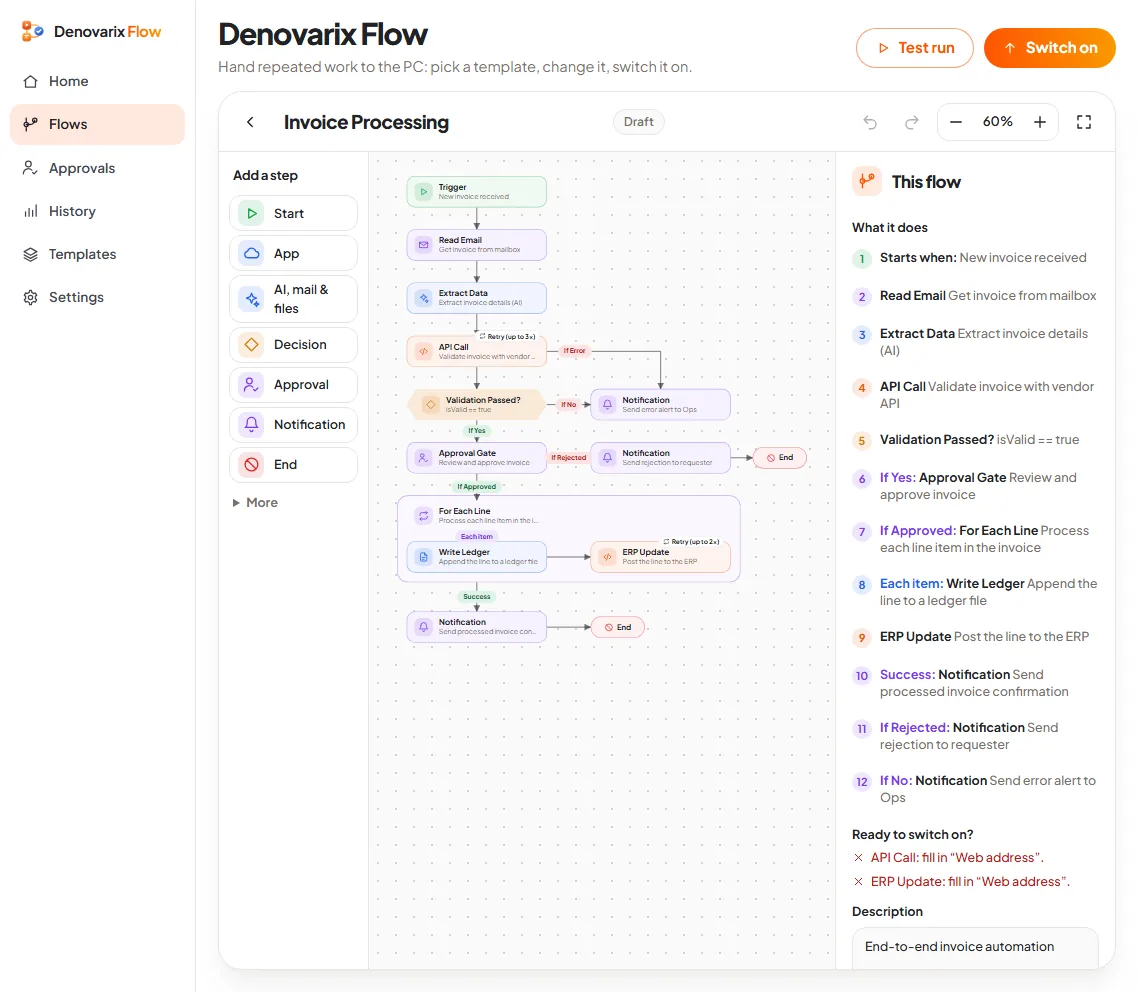
5. Fill in each system's details. A step that calls another system needs that system's address and a way in. Flow tells you which steps are still missing these before it lets you switch on.
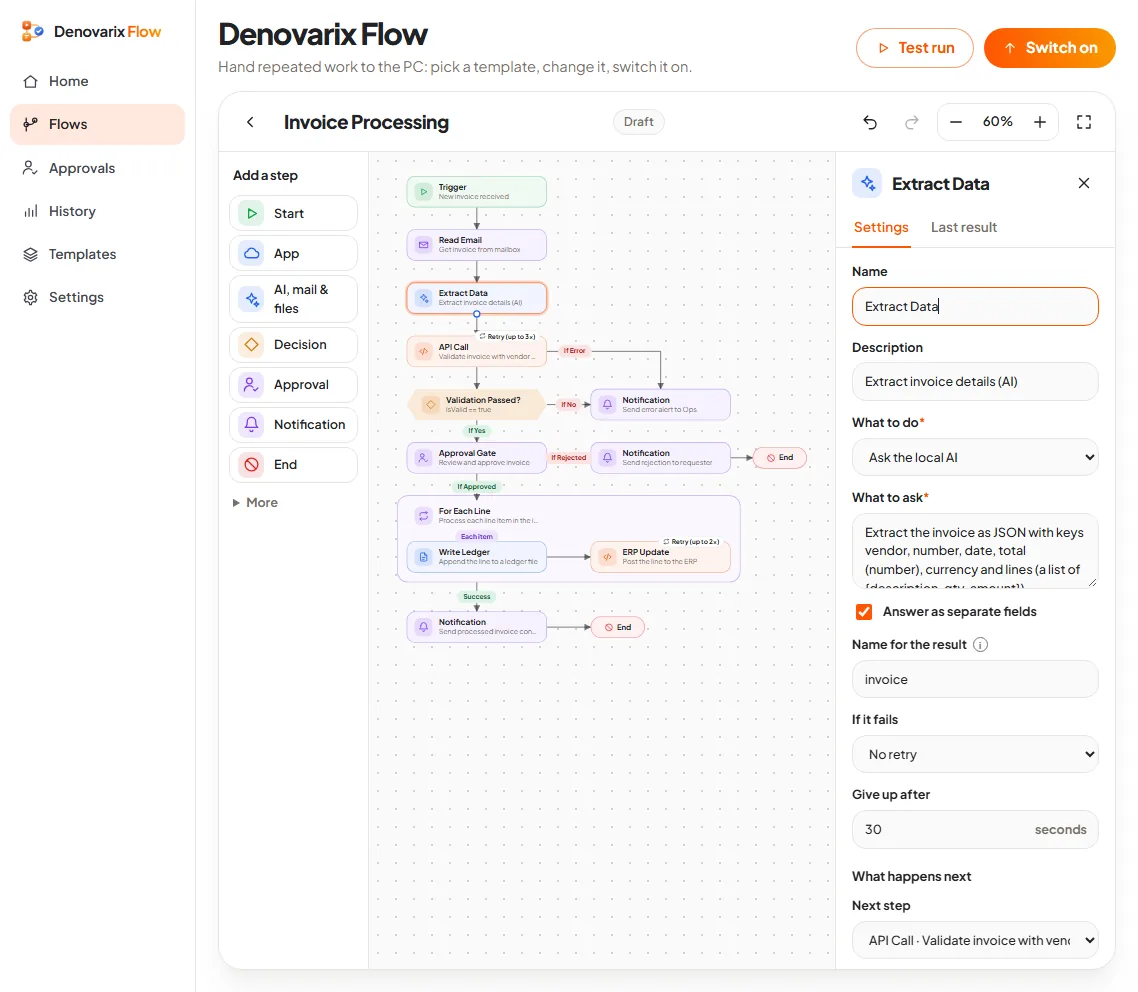
6. Decide what happens on failure. Each step can retry or stop. For money data, stop and notify a person. A silent failure is worse than retyping.
7. Run it beside the manual process for two weeks. Staff keep typing, and someone compares the two results daily. Stop the typing only when they have matched for a full week.
8. Then take the next field. Addresses, then invoices back to the CRM. One at a time.
What does it cost in effort?
Honestly, more than the software suggests:
- Matching and cleaning existing records: days, not hours, and it needs someone who knows the customers.
- Finding out what each old system allows: sometimes one phone call, sometimes a week of waiting for a vendor.
- Building and testing one flow: a few days once the first two are done.
- Watching it: a named person who reads the failure notices. Integrations need an owner for as long as they run.
What can go wrong?
- The old system has no way in. Then the connection has to be built around it, through its export files or its database, by someone who has done that before.
- Both sides get edited. If staff still correct addresses in the ERP, the next copy overwrites them. The owner rule has to be enforced.
- Duplicates multiply. Without the shared code, each run creates the customer again.
- Nobody reads the alerts. Failures pile up unseen and trust in the data falls below where it started.
- The first project is too big. "Connect everything" does not finish. "New orders reach the ERP by themselves" does.
When is this a project and not a template?
A template suits systems that already offer an API or dependable files. When the ERP is old, customised or undocumented, the work is engineering: reading its data safely, building the bridge and making the result fast and usable on a phone. That is the legacy modernisation work Denovarix takes on for a small number of clients each year, without a big-bang replacement. If that sounds like your situation, get in touch through the company page.
For the cases a template does cover, DNX Flow is part of DNX OS, in beta from December 2026 and launching in January 2027. You can apply for the beta and bring one flow of data you are tired of typing. The guide to business challenges collects the related articles, and vendor lock-in explains why export and import matter when you choose the next system.
Keep reading
Client documents scattered across laptops: a fix
Contracts and client files end up on personal laptops, email and pen drives. A plain plan to bring them to one home, protect the devices and keep it that way.

No numbers until month-end: how owners can fix it
Many owners see sales, receivables and cash only when the accountant closes the month. How to get five trusted numbers every week, and how to check each one.
Branches on WhatsApp groups: moving to company chat
A team spread across branches runs on consumer chat apps and personal numbers. What that risks, and how to move to a company chat in four weeks, step by step.