
Attendance and leave on WhatsApp: how to move off
Attendance in a register and leave approved on WhatsApp work until salary day. How a small Indian company moves both into one system, step by step, in a month.
Part of the guide: Business challenges and how technology solves them

The short answer: a paper register and a WhatsApp group are fine for recording attendance and leave. They fail at the three things you need at the end of the month: a balance everyone agrees on, a list of who was absent without leave, and a figure the accountant can use for salary. Moving off them is not a software project first. Decide your leave rules in writing, load the opening balances once, run the new system beside the old one for a month, and only then let it feed payroll.
What actually goes wrong with paper and WhatsApp?
Picture a 22-person design and print firm, as an example and not a real client. Staff sign a register at the door. Leave is requested in a WhatsApp group, and the owner replies with a thumbs-up when she sees it. At month-end the office manager reads the register, scrolls the group, and types the result into a spreadsheet for the accountant.
Nothing here is careless. The trouble is structural:
- The balance lives nowhere. Each person keeps their own count of casual leave. Disputes are settled by memory.
- Approvals are scattered. A thumbs-up in a group, a verbal yes in the corridor, a message to the manager directly. Three channels, no list.
- The register records presence, not time. Late arrivals and half days are argued afterwards.
- Someone retypes everything. That is where errors enter salary, and salary errors cost trust quickly.
- Personal phones hold company records. When the office manager leaves, the history leaves with her phone.
What should you decide before touching any software?
Four things, on one page, signed by the owner:
- Leave types and yearly entitlement. For example casual, sick and earned leave, with the number of days for each.
- Carry-forward. What happens to unused leave at the year end.
- Who approves whom. One named approver per person, and a stand-in.
- What counts as a day. Office hours, the grace period for late arrival, and how a half day is recorded.
Check the entitlement and working-hours rules with your accountant or payroll consultant, because they depend on your state and type of establishment. Our guide to choosing an HRMS for a small company lists the statutory items to ask about.
How do you move, step by step?
The screens below are from DNX People, the HR app in DNX OS. The order of work is the same with any HR tool.
1. Load people and opening balances. One record per employee, with the reporting manager and today's leave balance for each type. Agree each balance with the employee before loading it. This is the only time the old disputes need settling.
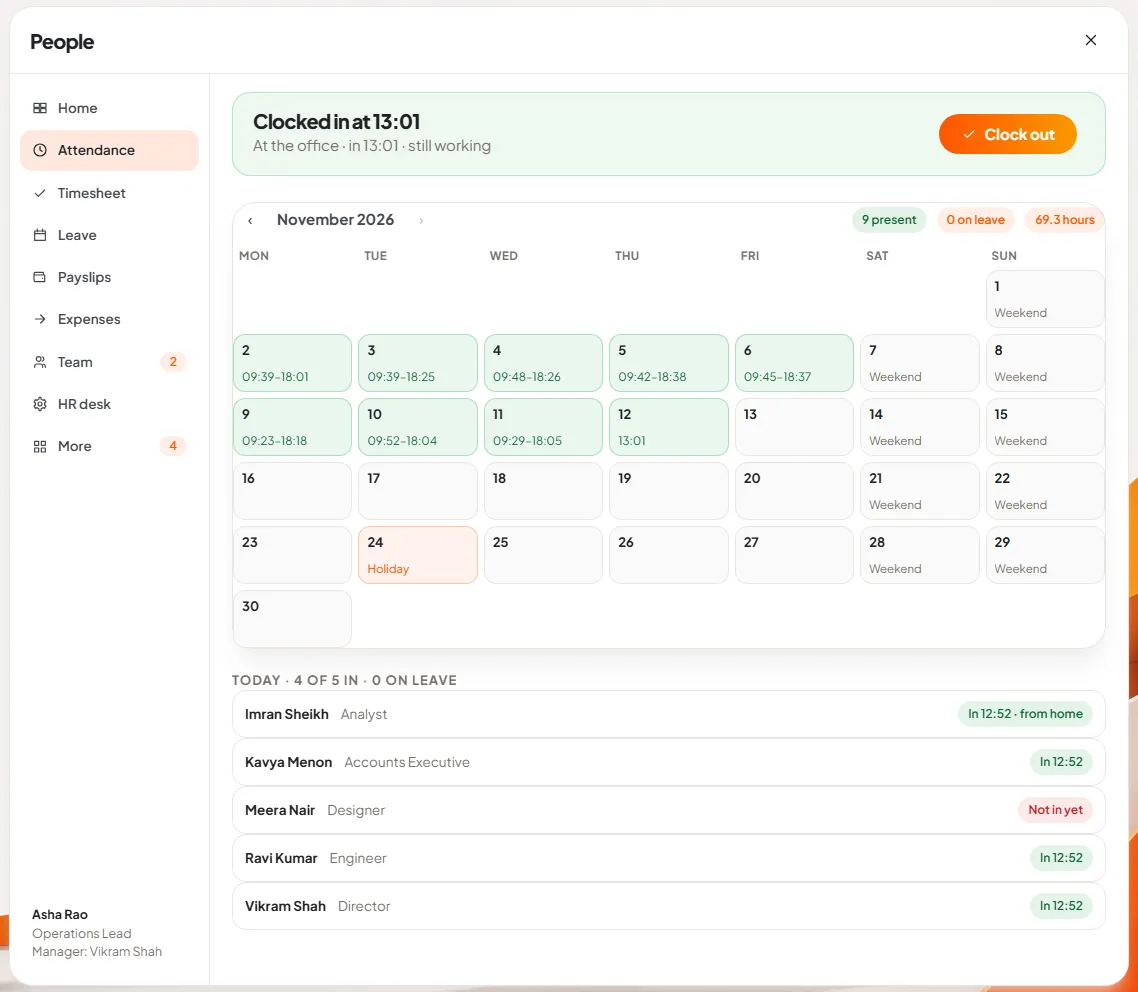
2. Start with attendance only. For the first week, ask everyone to clock in and out in the app as well as signing the register. The app shows a month calendar of in and out times and who in the team is in today.
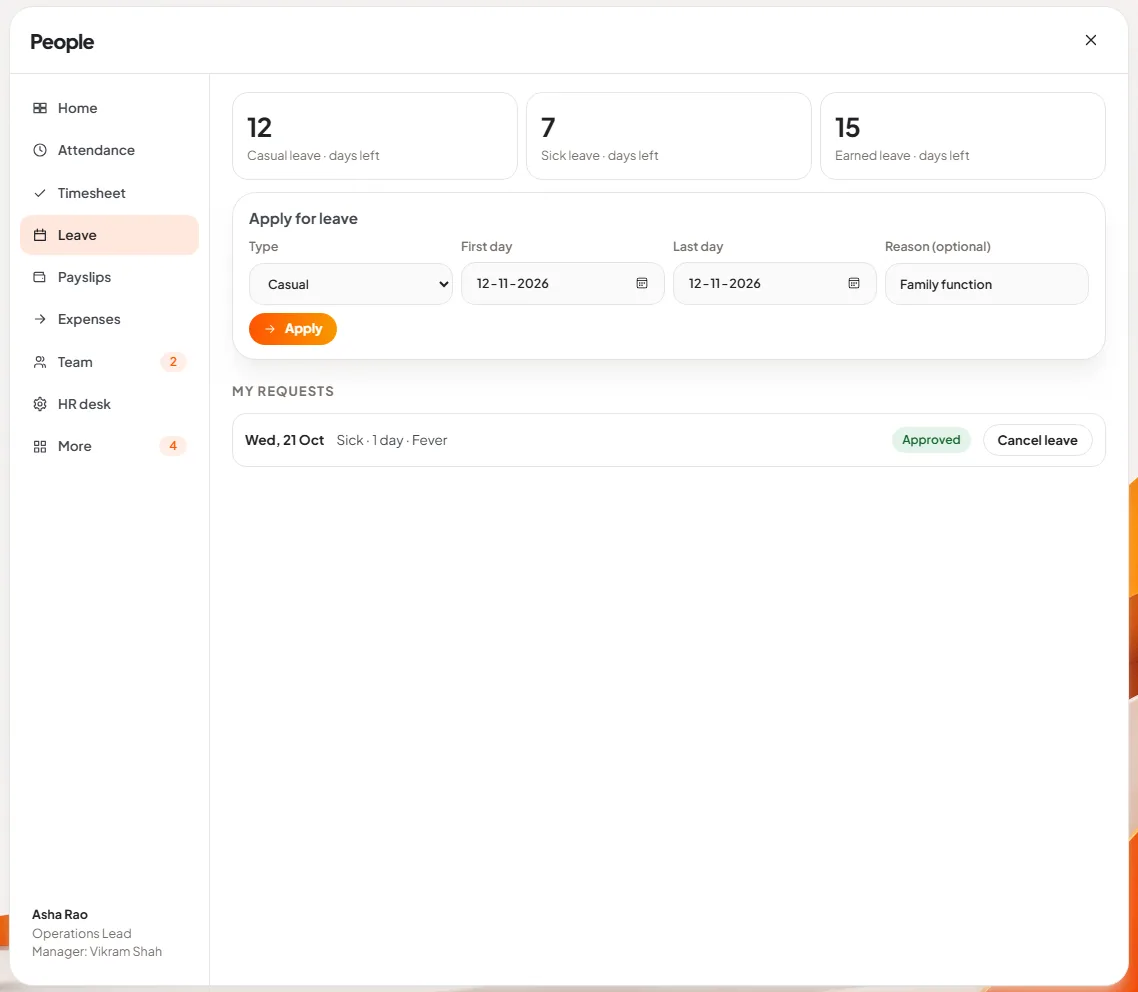
3. Move leave requests in week two. Announce one rule: leave exists only if it was applied for in the app. The employee sees the balance for each leave type and fills in a short form.
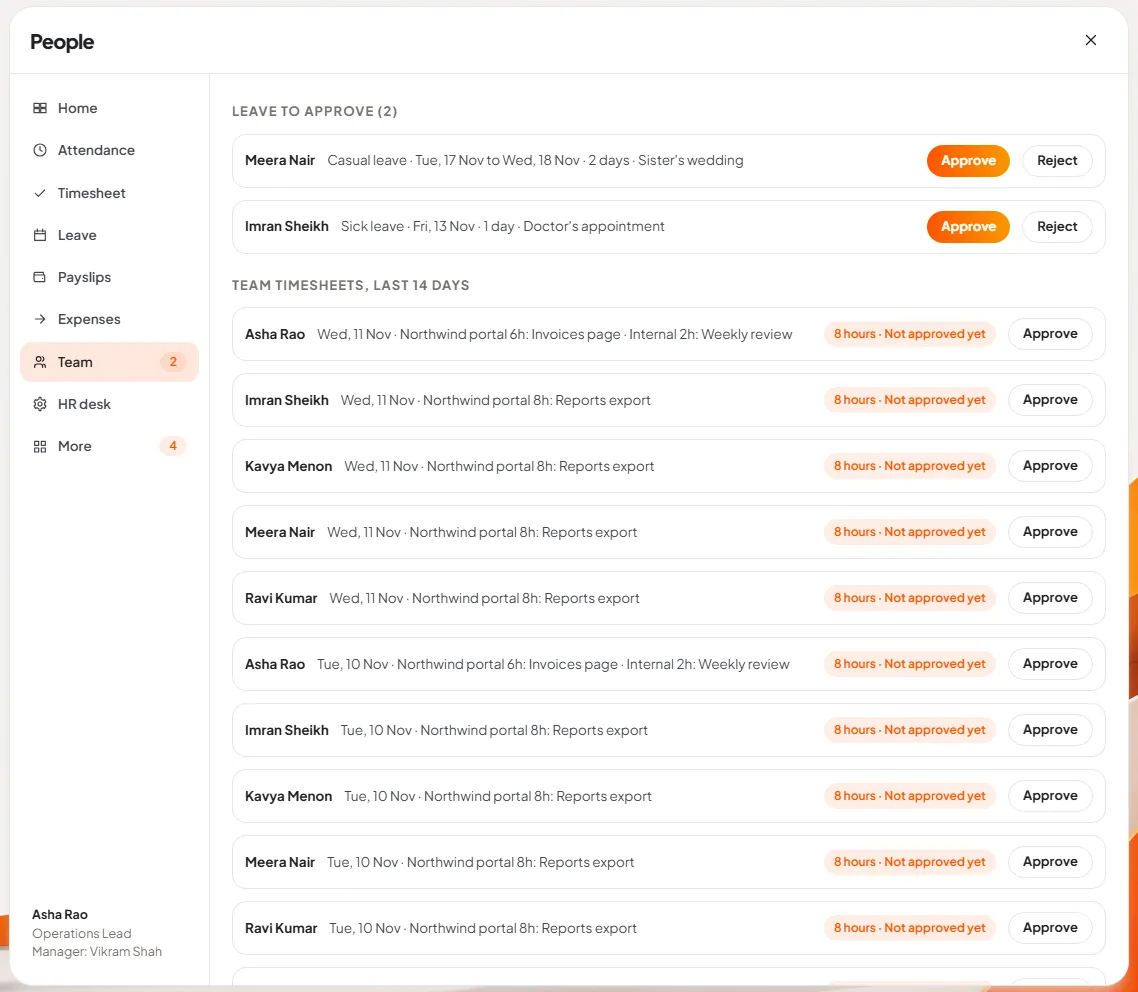
4. Give managers one place to approve. The Team page lists the leave requests waiting for that manager, with approve and reject, and the team's timesheets.
5. Compare for one month. At month-end, produce the absence list both ways: from the register and the WhatsApp group as before, and from the app. Investigate every difference. Most will be requests that were approved verbally and never entered, which is exactly the habit you are removing.
6. Retire the register. Only after one clean month. Keep the old registers for as long as your consultant advises.
7. Let it feed payslips. Once the absence figures are trusted, approved unpaid leave can reduce pay in the month's calculation, and payslips are issued from the same place.
What does it cost in effort?
- Half a day for the owner and office manager to write the one-page rules.
- A day or two to enter people and balances, more if records are untidy.
- One month of double entry. It is tedious and it is what makes the result trustworthy.
- A firm tone for about six weeks. The system fails the first time a senior person gets leave by message and nobody enters it.
What can go wrong?
- Managers keep approving on WhatsApp. Make the manager, not the employee, responsible for entering any leave they approved outside the app.
- Staff forget to clock out. Decide in advance how a missing clock-out is corrected and by whom.
- Opening balances are wrong. Fix them in the first month, in the open, not quietly later.
- Field staff are left out. People who never come to the office need the phone. DNX Hub has an Android app with people and approvals on it.
- Expecting full statutory payroll. Be clear about what your tool computes. DNX People, for example, issues payslips with provident fund at 12 per cent of capped basic and a professional tax amount set by HR, but it does not compute TDS, does not handle ESI, gratuity, bonus or labour welfare fund, and does not file returns. Its article lists these limits. Absence without leave is also not deducted automatically; only approved unpaid leave reduces pay. Your accountant still computes the statutory figures.
- The data moves to a place you did not choose. HR records hold salaries and medical leave. Ask where they are stored. Our DPDP Act checklist has the questions.
Where does DNX Hub fit?
DNX People runs on DNX Hub, a server your company hosts on its own premises or in an Indian data centre, and it uses the same sign-in as team chat and meetings. So attendance, leave, timesheets, expenses and payslips are in one place that you control, not in a group on personal phones. Related problems are collected in the guide to business challenges.
DNX OS is in beta from December 2026 and launches in January 2027. A four-week pilot is about the length of the comparison month described above, so if you are a registered Indian business with 5 to 50 people, apply for the beta and run the two side by side.
Keep reading
Same data typed into ERP, CRM and Excel: how to stop
When an order is typed into the CRM, the ERP and a spreadsheet, errors and delay follow. How to connect legacy systems one field at a time, and keep them.
Client documents scattered across laptops: a fix
Contracts and client files end up on personal laptops, email and pen drives. A plain plan to bring them to one home, protect the devices and keep it that way.

No numbers until month-end: how owners can fix it
Many owners see sales, receivables and cash only when the accountant closes the month. How to get five trusted numbers every week, and how to check each one.