
Invoices stuck in approval: how to fix the queue
Supplier invoices wait for days because the approval rule lives in people's heads. Write the rule down, give it one queue and automate the chasing. Steps here.
Part of the guide: Business challenges and how technology solves them
The short answer: invoices do not wait because people are slow. They wait because nobody can see the queue. The approval rule is unwritten, the request sits in one person's inbox, and the only reminder system is the accountant walking over. The fix has three parts: write the rule down in one sentence per level, put every request in one visible queue with a named approver, and let software do the chasing. A small company can do this in about a week, and the first part needs no software at all.
Why do invoices get stuck in the first place?
Take a 30-person trading firm in Kolkata, as an example. It is not a real company; it is the pattern we see most often. A supplier emails an invoice to whoever placed the order. That person forwards it to the accountant. The accountant needs a yes from the purchase manager, and above some amount, from a director as well. The director is travelling. The email is under forty others. Ten days later the supplier calls, and the accountant starts asking who has it.
Look at what is missing. Nobody has decided anything wrongly. There is simply:
- No single place where waiting invoices are listed.
- No written rule for who approves what, so borderline cases go to the most senior person "to be safe".
- No stand-in when an approver is away.
- No record of who approved, when, and what they were shown.
The cost is not only late-payment friction with suppliers. Month-end closes late because approvals arrive in a rush, and an auditor who asks "who approved this?" gets a forwarded email chain as the answer.
What should the approval rule look like?
Short enough to fit on one page. For the example firm:
| Invoice | Who approves | Stand-in |
|---|---|---|
| Up to ₹50,000, against a purchase order | Purchase manager | Accounts head |
| Above ₹50,000 | Purchase manager, then a director | The other director |
| No purchase order | Returned to the person who ordered, to raise one | None |
The amounts are an illustration. Yours will differ. What matters is that each row names a role, a limit and a stand-in, and that the owners sign the page. Do this before choosing any tool. A tool cannot automate a rule that three people would each describe differently.
Two decisions are worth making at the same time. First, one address for supplier invoices, such as a shared accounts mailbox, so that invoices stop arriving in six inboxes. Second, a time limit after which a waiting request is raised with the stand-in.
How do you put the rule into a system, step by step?
The steps below use DNX Flow, the automation app in DNX OS, because we can show its real screens. The same sequence applies with any approval tool.
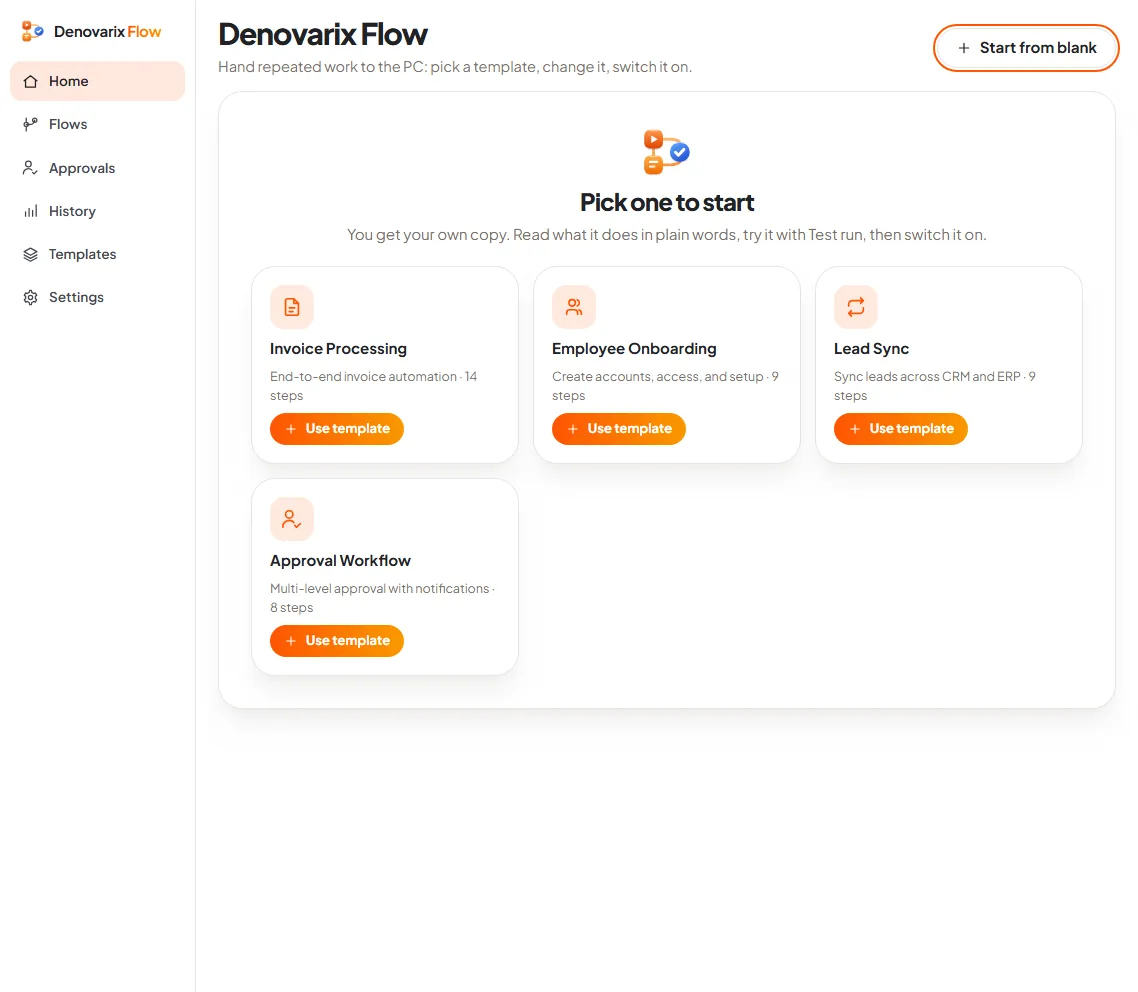
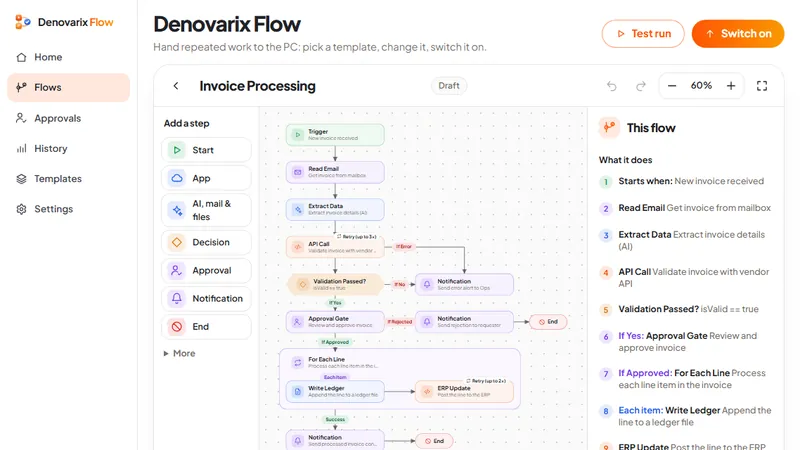
1. Start from a template. Flow offers four ready templates. Two matter here: Approval Workflow, a multi-level approval with notifications, and Invoice Processing, which reads the invoice as well. Begin with the simpler one.
2. Set the limit and the approvers. The template carries a decision step, "Over 50,000?", which sends larger requests to a second approver. The amount is one field. Change it to your own limit and name the people.
3. Test before switching on. A test run goes through every step once so that you can see which branch a sample amount takes. Steps that change anything work only after the flow is switched on, so a test cannot send a real request to the wrong person.
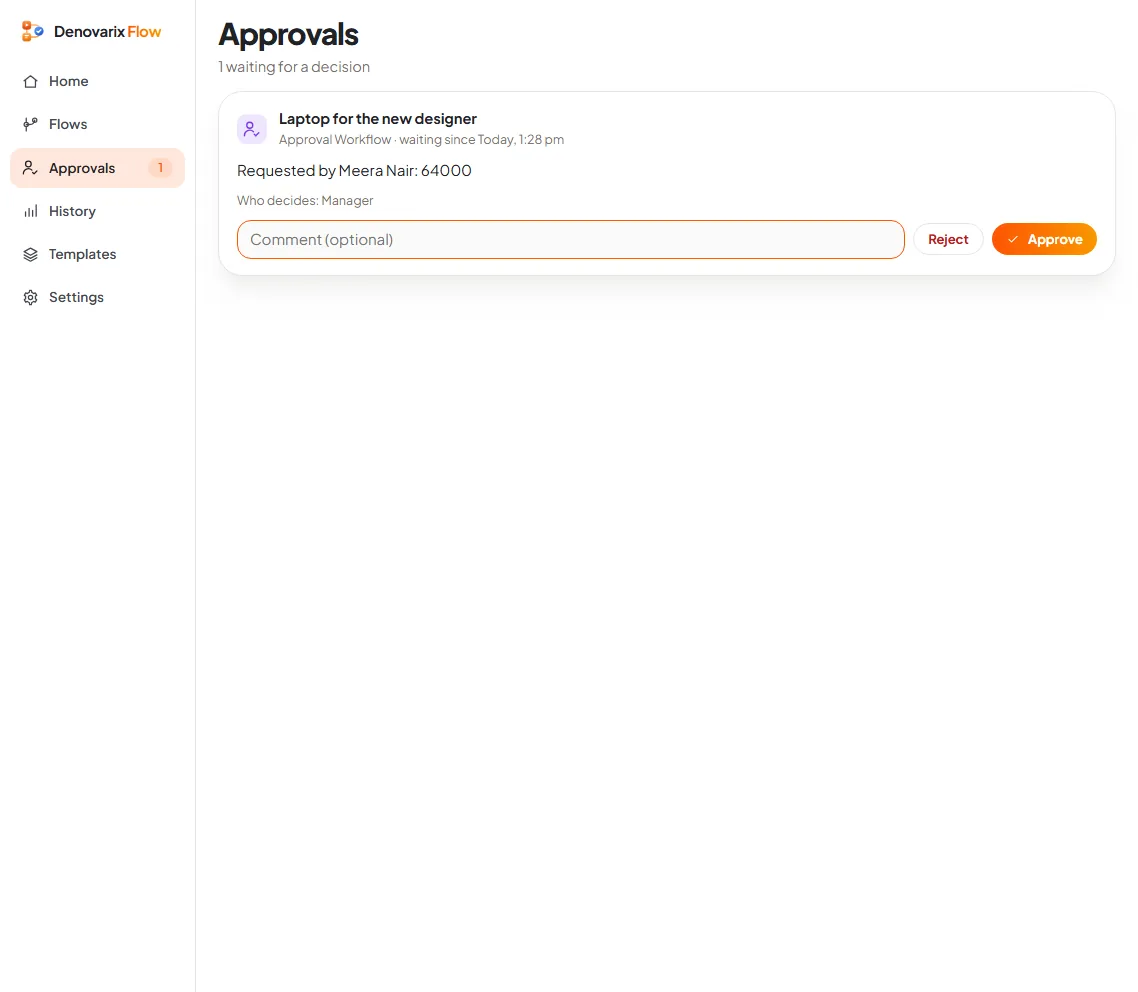
4. Switch on and use the queue. From now on a request stops at the approval step and waits on the Approvals page, with who asked, what for, who decides, a comment box, and Reject and Approve.
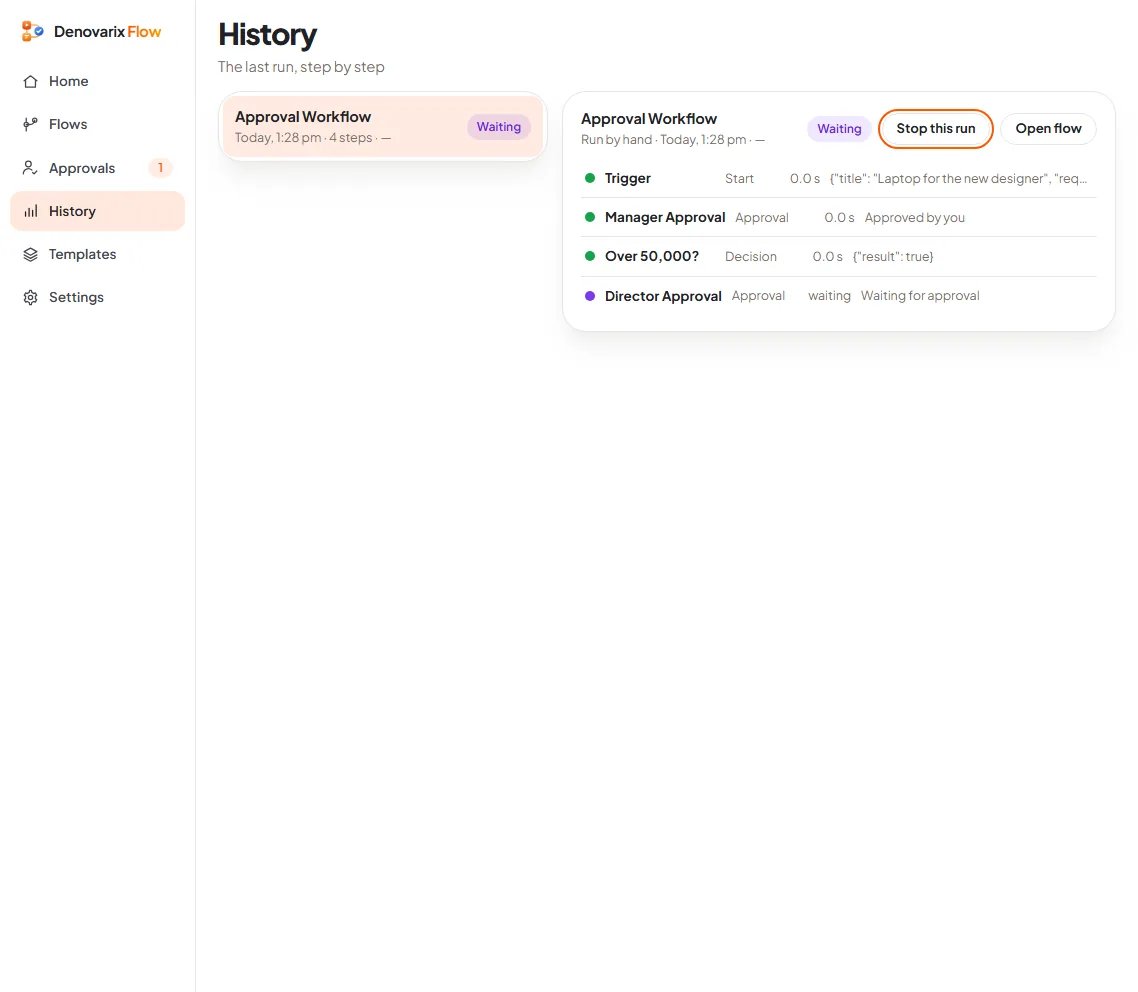
5. Follow each request. The History page shows where a request is: the manager approved, the amount was over the limit, the director's approval is waiting. That page is the answer to "who has it?", and later to the auditor's question.
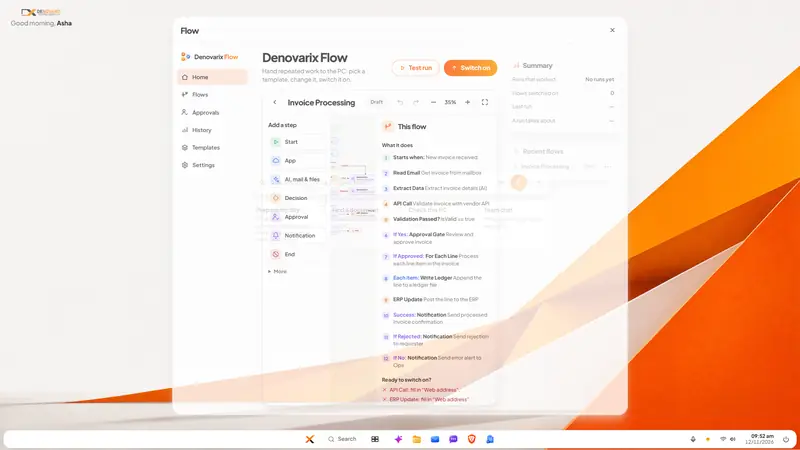
6. Add invoice reading later, if at all. The Invoice Processing template can pick the invoice from the mailbox and ask the on-device AI to extract its details. Treat that as a second project. Get the approval queue working first.
What does it cost in effort?
We will not quote a saving, because we have not measured one in your company and neither has anyone else. In effort, expect roughly this:
- An hour or two with the owners to agree the table above. This is the hard part, and it is a conversation, not a technical task.
- About a day to set up the flow, test it with sample amounts and show the approvers where their queue is.
- A few weeks of habit. The queue only works if nobody approves by phone call "just this once". Each exception teaches the team that the old way still works.
- Ten minutes a week for one person to look at what has been waiting longest.
What can go wrong?
- The rule is too detailed. Twelve categories with different limits will be bypassed. Start with two levels.
- The approver never opens the queue. In DNX Flow today the person who decides opens the Approvals page on a DNX OS computer. The app article says plainly that approval from a phone or by email reply is not shown. If your directors are rarely at a desk, name a stand-in who is.
- The machine is off. A flow runs on the PC or server where it is switched on. Put it on a machine that stays on.
- Extracted figures are trusted blindly. Invoice reading uses a small on-device model. Check its output on your own invoices, especially scanned or handwritten ones, before anything is posted unattended.
- Posting to the accounting system is assumed. The template cannot post to your accounting software until that system offers a way in and you have filled in its details. Many companies stop at "approved, then entered by the accountant", and that is already most of the gain.
- Approval becomes a rubber stamp. If a director approves forty requests in two minutes, the limit is too low. Raise it.
Do you need new software to fix this?
Not for the first half. A written rule, one accounts mailbox and a shared register of waiting invoices, checked every Monday, will remove most of the delay. Software earns its place when the register itself becomes the thing nobody updates.
If you want the queue, the two-level rule and the history without renting a separate workflow service, that is what DNX Flow is for. It is part of DNX OS, and the flow and its AI step run on your own machine, so supplier names, amounts and bank details do not pass through an outside service. More problems of this kind are collected in the guide to business challenges and how technology solves them.
DNX OS is in beta from December 2026 and launches in January 2027. Registered Indian businesses with 5 to 50 people can apply for the beta; bring the approval that annoys everyone in your office. If the real obstacle is an older accounting or ERP system that nothing can connect to, that is a client project in legacy modernisation, and you can write to us about it.
Keep reading

Attendance and leave on WhatsApp: how to move off
Attendance in a register and leave approved on WhatsApp work until salary day. How a small Indian company moves both into one system, step by step, in a month.
Same data typed into ERP, CRM and Excel: how to stop
When an order is typed into the CRM, the ERP and a spreadsheet, errors and delay follow. How to connect legacy systems one field at a time, and keep them.
Client documents scattered across laptops: a fix
Contracts and client files end up on personal laptops, email and pen drives. A plain plan to bring them to one home, protect the devices and keep it that way.