
Adobe Acrobat alternative: edit PDFs, no subscription
An Adobe Acrobat alternative for offices that edit, sign and redact PDFs: what Acrobat Pro does well, what DNX PDF Editor covers and lacks, and how to switch.
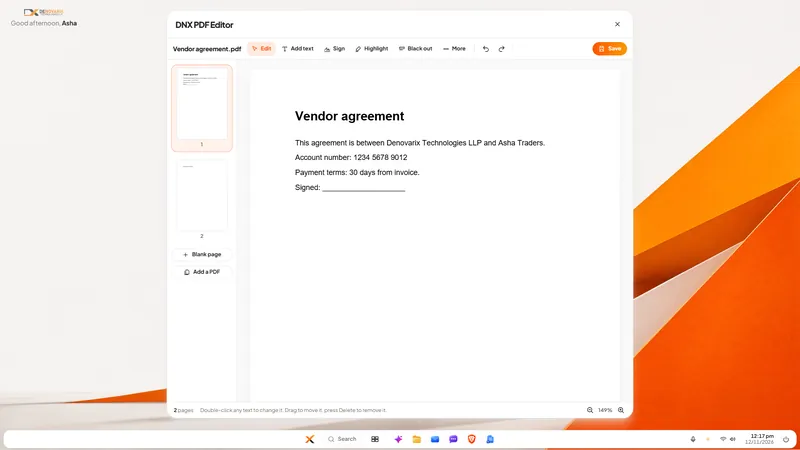
The short answer: Adobe Acrobat Pro does more with PDFs than DNX PDF Editor does, and if you need scans turned into editable text, e-signature requests with tracking, or file comparison, keep it. Most offices use a PDF editor for five jobs: change a line of text, add text, sign, black out private details and reorder pages. DNX PDF Editor does those on the file on your PC, with nothing uploaded, and it is included in DNX OS, so there is no separate PDF subscription. DNX OS is in beta from December 2026 and launches in January 2027, with no published price.
Who is this page for?
Offices that pay for a few PDF licences so that someone can correct a clause, sign an agreement or remove an account number before sending a document on. Accounts teams, HR, sales administration, small legal and compliance teams. It is not for publishers, or for anyone whose work depends on Acrobat's advanced features listed below.
What does Adobe Acrobat Pro do well?
From Adobe's Acrobat Pro page for India, read on 12 November 2026:
- Editing. "Take full creative control of your PDF. Fix typos, change fonts, swap and crop images and more."
- Scans to text. Adobe says you can "turn scans into fully searchable and editable PDFs" using optical character recognition.
- E-signatures. "Request e-signatures, track status and even set reminders to keep work flowing."
- Conversion. "Convert your PDFs into Microsoft file formats like Word, PowerPoint and Excel."
- Redaction. "Permanently redact sensitive data from a PDF."
- Comparison. The page's questions and answers say you can "Compare PDFs to review differences."
- AI. An AI Assistant is offered as an addition to an Acrobat plan.
On how it is sold, the same page describes plans as "Annual, billed monthly", notes that monthly plans are also available, and offers a free trial. We have not quoted prices; read them on Adobe's page on the day you decide.
That is a long and capable list. Acrobat is the reference product for PDFs, and nothing below changes that.
How does DNX PDF Editor compare?
| Job | Adobe Acrobat Pro | DNX PDF Editor |
|---|---|---|
| Change the text inside a PDF | Yes, text and images | Yes, in place; the line keeps its position and the paragraph does not re-flow |
| Add text, highlight, notes, shapes, pictures | See Adobe's page | Yes |
| Sign | E-signature requests with tracking and reminders | A signature typed in a handwriting style and placed on the page |
| Black out private details for good | Yes | Yes; the text under the box is removed from the file when saved |
| Add, turn, remove and reorder pages | See Adobe's page | Yes |
| Fill forms | See Adobe's page | Yes |
| Turn a scan into editable text | Yes, with OCR | Not inside the editor |
| Convert PDF to Word, Excel, PowerPoint | Yes | Not stated for the editor |
| Compare two PDFs | Yes | No |
| Where the file is worked on | See Adobe's page | On your PC; nothing is uploaded |
| How it is paid for | A subscription | Included in DNX OS; price not published |
| Runs on | See Adobe's page | DNX OS only |
What does DNX PDF Editor not do yet?
- It does not turn a scan into editable text inside the editor. A scanned page is a picture. You can black out parts of it, sign it and add text on top, but you cannot double-click a scanned word to change it. Nova, the assistant in DNX OS, can read scanned documents separately.
- No digital signature certificates and no eSign. The signature is a visible mark on the page. If a counterparty or a regulator requires a certificate-based digital signature, you need a tool that provides one.
- Black-out has two known limits. A drawn line or shape that only partly crosses the box is painted over, not cut out, and hidden description text that some PDFs carry for screen readers is not cleaned. For text and pictures, which is nearly every case, the content is removed.
- Edited text does not re-flow. For heavy rewriting, edit the original document in DNX Word and export again.
- It is not a separate download. It comes with DNX OS and DNX Office. It is not an app for Windows or Mac.
How do you switch?
- Count what your PDF licences are used for. Ask each holder for the last ten things they did. Most lists are short.
- Split the holders in two. Those who only edit, sign, black out and reorder; and those who need OCR to editable text, tracked e-signature requests, conversion or comparison.
- Test the first group's real files in DNX PDF Editor during the beta: a contract, a bank form, a scanned letter. Check the black-out by searching the saved file for the hidden text.
- Keep licences for the second group. There is no reason to force a weaker tool on the two people who use the advanced features daily.
- Check signature requirements with your lawyer for the documents you sign most.
- Let the unneeded licences lapse at renewal.
An honest outcome for many offices is fewer PDF licences, not none.
Which articles show the editor?
- DNX PDF Editor: edit PDFs without a subscription: seven real screens, from opening a file to saving with black-out.
- DNX Office: open and save Word, Excel, PowerPoint: the suite the editor belongs to.
- What software really costs a 25-person company in India: how small subscriptions add up.
- Client documents scattered across laptops: a fix: keeping the files in one place.
The same slideshow is on the DNX OS page. To try it on your own documents, apply for the beta. Costs and lock-in are covered in the guide to replacing the vendor stack.
Sources
Read on 12 November 2026. Adobe and Acrobat are Adobe's names, used here only to identify the product being compared.
- Adobe, Acrobat Pro (India): the features quoted above, the AI Assistant, the plan terms and the free trial.
Other comparisons
- Microsoft 365 alternative
- Looking for a Microsoft 365 alternative in India? What Microsoft 365 does well, how a stack you own differs, what DNX OS does not do yet, and how to switch.
- Google Workspace alternative
- A fair look at a Google Workspace alternative for Indian companies: what Workspace does well, where an owned stack differs, DNX OS's limits, and how to move.
- Zoho One alternative
- Considering a Zoho One alternative? What Zoho One does well, how a self-hosted stack with on-device AI differs, what DNX OS lacks today, and how to switch over.
- ChatGPT alternative (private AI)
- A ChatGPT alternative for companies that cannot share client data: what OpenAI's own pages say, how on-device AI differs, Nova's limits, and how to roll it out.
- Slack or Teams alternative
- A Slack or Microsoft Teams alternative that keeps chat data in India: what each vendor's own pages say about Indian residency, and what self-hosting changes.